
Table of Contents
- Key Highlights:
- Introduction
- Why I Chose the Keychron K2 HE
- Understanding Hall-Effect Switch Technology
- The Appeal of a 75% Layout
- The Keychron K2 HE as a Work and Gaming Tool
- A Deep Dive into Gaming Performance
- Assessing Price and Alternatives
- The Ongoing Evolution of Personal Typing Preferences
Key Highlights:
- The Keychron K2 HE features innovative hall-effect switches that allow customizable actuation heights, enhancing responsiveness for both gaming and typing.
- With a 75% keyboard layout, it balances space-saving design with functionality, catering especially to users who prefer a compact yet complete typing experience.
- Importantly, the K2 HE is firmware-compatible with QMK, opening the door for extensive user customization compared to many proprietary options.
Introduction
In the world of mechanical keyboards, few names rise as distinctively as Keychron. Among its offerings, the K2 HE has garnered attention not just for its aesthetic appeal but for significant functional upgrades that promise to enhance the typing and gaming experience. This post delves into the intricacies of the Keychron K2 HE, examining its features, the rationale behind choosing this keyboard, and how it performs in various use cases.
Why I Chose the Keychron K2 HE
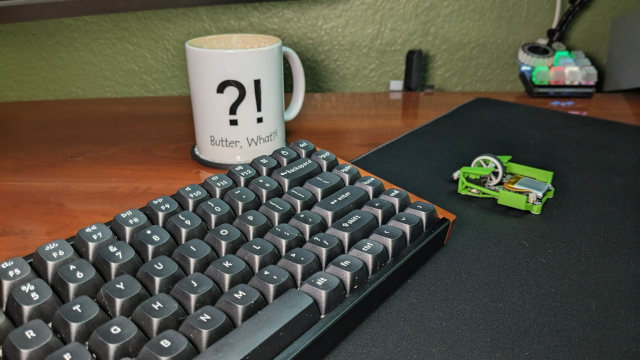
The journey to selecting the Keychron K2 HE began with a desire for a keyboard upgrade rooted in usability. Having spent years on a budget keyboard with basic cherry MX Blue switches, the transition to the K2 HE wasn’t just about aesthetics; it was about performance. The allure of hall-effect switches, known for their responsiveness and customizable actuation heights, made this model particularly enticing.
Hall-effect switches represent a leap in keyboard technology. Unlike traditional mechanical switches that rely on physical movement to register keystrokes, hall-effect switches use magnets and sensors to detect key presses. This means users can customize the actuation point, allowing for rapid key presses—ideal for both gaming and quick typing tasks.
Selecting the special edition with wood accents added a touch of personal flair, although one may ponder its necessity compared to the base model.
Understanding Hall-Effect Switch Technology
Hall-effect switches are one of the standout features of the K2 HE, transforming the typical typing experience. Their unique construction enables a variable actuation point, which can be adjusted through software. This means users can set a lower actuation height for gaming to achieve an almost instantaneous response.
The unique mechanics of these switches even allow for 'dynamic keystrokes', whereby lifting a key can re-activate another key already pressed, reminiscent of controls in fast-paced multiplayer games. Despite the potential benefits, skepticism looms regarding the practicality of these features. Are they merely gimmicks?
Early tests show the K2 HE’s programming interface allows for considerable customization, including engaging four different actions at varying key depths. While excitement accompanies such innovations, it’s essential to assess whether they substantively enhance the user experience or complicate it unnecessarily.
The Appeal of a 75% Layout
When evaluating keyboard layouts, I preferred the 75% configuration of the K2 HE. This design excludes the number pad, providing a compact footprint while retaining essential functionality. It's tailored for users who primarily engage in text typing and programming rather than extensive number crunching, making it ideal for modern computing needs.
Reducing desk clutter is another significant reason for this layout preference. An uncluttered workspace promotes better focus and ergonomics, allowing for seamless movement between keyboard and mouse. This ergonomics-centric consideration cannot be overstated, particularly in an era where remote work and digital collaboration are predominant.
Function keys also play a crucial role in my daily workflow. Providing a range of customizable functions reduces the need for physical macro pads, making full use of the keyboard's utility.
The Keychron K2 HE as a Work and Gaming Tool
The duality of the K2 HE as both a productivity tool and a gaming apparatus is noteworthy. While it's essential for writing and business tasks, its gaming capabilities elevate it beyond a simple typing device. Transitioning between various tasks—from drafting a blog post to gaming sessions—requires not just a responsive tool but one that embodies versatility.
One notable feature of the K2 HE is its customizable profiles. Each profile can be tailored for different tasks: a more robust setting for typing with heightened actuation and a gaming profile that engages the swift, low-distance actuation necessary for competitive play.
The experience of gaming on the K2 HE introduces users to an entirely new realm. Unlike traditional blue switches, which can be noisy and less forgiving, the linear hall-effect keys offer a quiet, smooth keystroke. This attribute, combined with their rapid engagement, proves beneficial in action-packed environments where every millisecond counts.
A Deep Dive into Gaming Performance
Reflecting on personal experiences, the K2 HE's performance in gaming proves to be beneficial. While my initial forays into games like "Team Fortress 2" have shown me the mechanics of rapid actuation, I discovered nuances such as how the keyboard can emulate analog input through its function remapping.
When partially pressing keys, such as those on the WASD cluster, players can simulate character movement speeds akin to an analog joystick. This function adds depth to movement controls in first-person shooters, providing an improved gameplay experience, particularly in titles requiring situational dodges or nuanced motion controls.
As I ventured into immersive titles like "Cyberpunk 2077," I recognized the potential for the K2 HE to mitigate challenges associated with traditional keyboard driving mechanics—often criticized for their responsiveness.
Assessing Price and Alternatives
One common hesitation surrounding the K2 HE stems from its price. Listed at approximately $140, many readers may question whether such an investment is worth it for their specific use cases. Some may liken it to spending more than necessary when adequately functional alternatives exist.
For those averse to higher-priced models, several alternatives provide good value. The Keychron K2 Max distills many of the K2 HE's features at a lower cost, while still sustaining versatile functionality—suitable for both casual typing and gaming alike.
Moreover, budding enthusiasts looking to explore the world of hall-effect switches could consider cost-effective models like the Yunzii RT75. Selling at around $72, it offers comparable features without the extensive customizations found in higher-end models. Evaluating which traits are most important will ultimately steer a user toward the best choice for their preferences.
The Ongoing Evolution of Personal Typing Preferences
As technology evolves, so do individual needs regarding keyboard functionalities. The combination of gaming and productivity seamlessly meshes in the Keychron K2 HE, resulting in a keyboard that not only meets the demands of gamers but also enhances the typing experience for day-to-day work.
There remains an air of curiosity about the extent of customization available with hall-effect switches. Whether exploring macro bindings for specific games or setting up unique profiles for various software programs, the K2 HE is designed to cater to both casual and seasoned users alike.
FAQ
What are hall-effect switches, and how do they differ from traditional switches?
Hall-effect switches operate using magnets and sensors, allowing them to detect key presses without the need for physical movement. This results in greater responsiveness, adjustable actuation points, and quieter operation compared to traditional mechanical switches.
Is the Keychron K2 HE suitable for both gaming and typing?
Yes, the K2 HE is designed to accommodate both gaming and typing experiences. Its customizable settings allow users to optimize the keyboard for varying tasks, enhancing performance in both realms.
What makes a 75% keyboard layout advantageous?
A 75% keyboard layout is compact, omitting the number pad, which frees up valuable desk space. It retains the essential keys needed for productivity while promoting better ergonomics and ease of transition between keyboard and mouse movements.
Can I customize the Keychron K2 HE?
Absolutely! The K2 HE runs open-source firmware via QMK, enabling users to customize key functions, lighting effects, and profiles for different tasks.
Are there more affordable alternatives to the Keychron K2 HE?
Yes, alternatives like the Keychron K2 Max or Yunzii RT75 offer competitive features at lower price points, making them viable options for those pursuing functionality without the high cost.
Overall, the Keychron K2 HE exemplifies a balance of innovation, usability, and aesthetic appeal—reinforcing its place as a preferred choice for users seeking both performance and style. Its customizable nature, advanced switch technology, and ergonomic layout create a compelling case for elevating typing and gaming experiences.